Messages, email and SMS
Where to find every email and SMS TimeToBook has sent about your bookings, what gets sent automatically, and how to resend one.
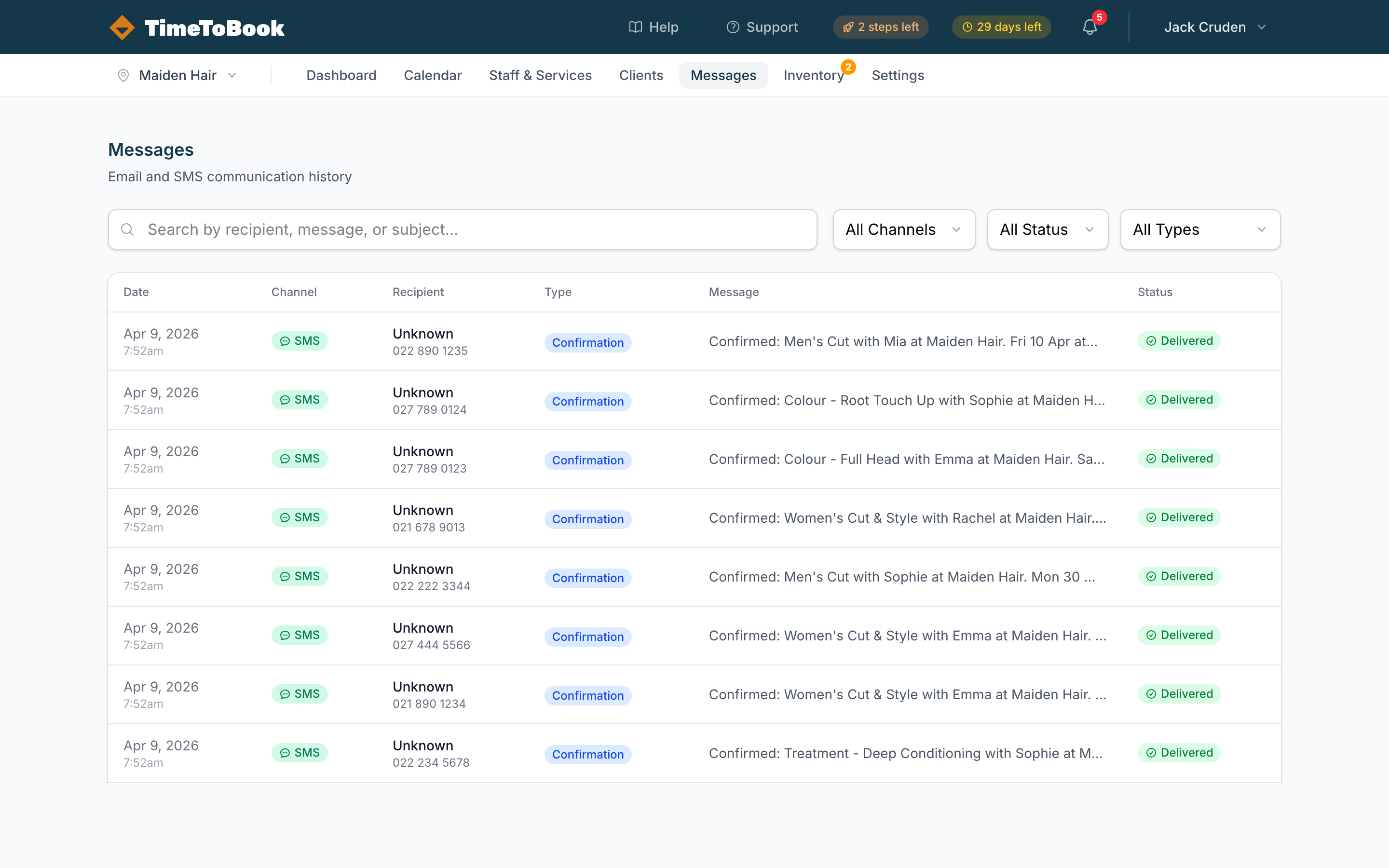
The Messages page is a log of every email and SMS TimeToBook has sent about your bookings: mostly confirmations and reminders to your clients, plus alerts sent to you and your team. Use it to check whether a reminder landed, look into a delivery issue, or just see what your clients received.
What gets sent automatically
Clients get two kinds of message: a confirmation when the booking is made, and reminders before the appointment. Both are set up in Settings → Notifications.
| Message | Channel | Default | When |
|---|---|---|---|
| Booking confirmation | On | As soon as the booking is made | |
| Booking confirmation | SMS | Off | As soon as the booking is made (credits required) |
| Appointment reminder | On, 1 day before | At the time you choose | |
| Appointment reminder | SMS | Off | At the time you choose (credits required) |
- Online bookings send the confirmation automatically. For bookings you add on the calendar, the client only gets a confirmation if you click Create & Notify instead of the normal save.
- Reminders go out for every upcoming appointment, however it was booked. Under Reminders you can add more than one reminder, pick when each is sent (from 1 hour to 1 week before) and tick Email, SMS or both for each. At the moment each booking gets one reminder: the earliest one still to come when the booking was made.
- SMS only sends if you have credits. Without credits the SMS boxes are greyed out and texts are skipped.
To change the wording of confirmations and reminders, see Customising confirmation and reminder messages.
What clients don't get
- No cancellation message. If a booking is cancelled (by you or by the client), the client isn't sent an email or SMS about it. Let them know yourself if you cancel on their behalf.
- No reschedule message. Clients can't reschedule online; to move an appointment they cancel and book again. If you move a booking on the calendar, the client isn't told automatically. (If you ask Tim to move a booking and tell the client, he sends them a fresh confirmation with the new time.)
The log also shows alerts sent to you and your team, like New Booking Alert emails and cancellation emails, if you've turned those on.
Sending a message to a client
There's no way to write and send your own one-off email or text to a client from TimeToBook. On a client's profile you can:
- Send reminder: next to each upcoming booking. This sends the reminder straight away, by email (if they have an email address) and by SMS (if they have a phone number and you have credits).
- Resend: next to a confirmation or reminder that failed or bounced. It resends just the channel that failed, once.
Filtering the list
The Messages page has three filters:
- All Channels: SMS, Email, or both.
- All Status: Sent, Delivered, Opened, Bounced, Failed.
- All Types: Confirmation, Reminder, Cancellation, Alert, Staff Reminder.
The search box at the top lets you find messages by recipient, message, or subject.
Delivery status
Each row shows a status:
- Queued: waiting to be sent.
- Sent: the provider accepted the message.
- Delivered: the provider confirmed it reached the phone or inbox.
- Opened: the client opened the email.
- Bounced: the email couldn't be delivered, usually because the address is wrong.
- Failed: something went wrong. A short reason is shown under the status.
If a message is stuck on Queued for more than a few minutes, contact support. To resend a failed confirmation or reminder, use Resend on the client's profile.
SMS credits
SMS isn't free. Each message costs a few cents, and that cost comes out of your SMS credit balance. When you run low, top up from Settings → Billing.
Prepaid credits never expire. SMS is not included in the free Solo plan or the trial, so buy a credit pack at any time to enable it. See Billing and trials for pack prices.
How many credits did a message cost?
A single SMS segment is 160 characters for plain text (GSM-7) or 70 characters for Unicode (anything with emoji or accented characters). If your message is longer than that, carriers split it into multiple segments, and each segment costs one credit:
- Plain text: 1 credit per 160 chars, then 153 chars per extra segment (7 bytes per segment are reserved for joining).
- Unicode: 1 credit per 70 chars, then 67 chars per extra segment.
On the Messages page, any SMS that used more than one credit is tagged with an amber "N credits" badge so you can see where your balance is going. For the full breakdown, see SMS credits.
Opt-outs and replies
If a client replies STOP to an SMS, they're opted out and TimeToBook won't send them any more SMS. They'll still receive emails. There's no way to opt them back in from the app; contact support if a client asks.
Other replies to booking texts aren't acted on and don't show up anywhere in TimeToBook, so a reply like "C" or "can't make it" won't cancel the booking. Ask clients to use the Manage Your Booking link to cancel, or to contact you directly.
Still stuck?
Our support team is ready to help.